Unboxing and First Impressions: XPPen Deco Pro LW
I recently ordered the XPPen Deco Pro LW from BestBuy.ca for an unbeatable price of $165.99. FedEx delivered it within two days, which was surprisingly fast and very impressive. What’s even more amazing is how well this tablet performs right out of the box. I primarily use it for texture painting in Blender, and so far, it has exceeded all expectations.
Performance and Software Setup
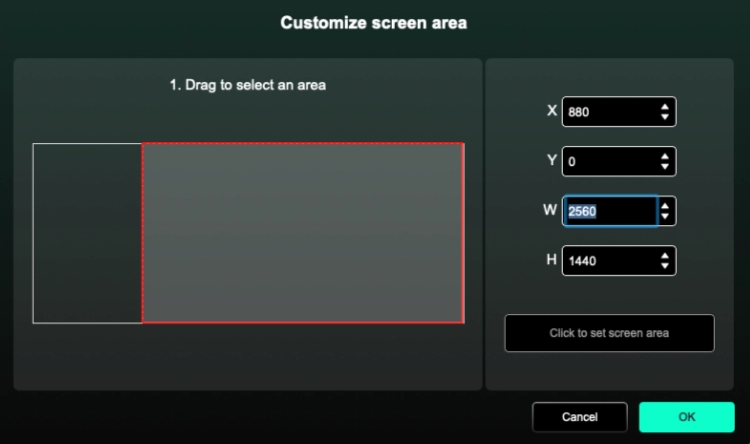
The active drawing area of 11″ x 7″ fits perfectly alongside my 34″ ultrawide LG monitor. Configuring the tablet for my 1440p monitor was straightforward with the XPPen Gen 2 software (download labeled as “Deco Pro,” not XPPen; link: XPPen software download). The driver lets you easily set custom tablet areas to avoid distortion. For example, I configured an exact 2560×1440 right-aligned workspace to match my screen setup, maximizing accuracy during painting.
Software Compatibility and Usage Experience
Initially, I tested the tablet with Pixelmator Pro, but my experience was disappointing. Strokes would prematurely cut off, and overall responsiveness was poor. Switching to Affinity Photo instantly resolved all issues: the eraser worked, and line control was precise. I am so unimpressed with Pixelmator Pro that I plan to uninstall it soon.
How to Turn the Power Off
The rear panel has a switch to select between two Bluetooth devices, plus a power button that also functions as a Bluetooth pairing button.
To turn off the power:
- Hold the power button for 3 seconds (top-center LED goes completely dark)
To pair the tablet:
- Hold the power button for 6 seconds (LED flashes blue quickly).
Is the XPPen Deco Pro LW Worth It?
I primarily use the tablet for texture painting in Blender, which makes the process significantly easier compared to using my M10 Bluetooth mouse from AliExpress; plus, relying on the tablet for painting helps extend the mouse’s battery life by reducing its workload.
The Deco Pro LW combines excellent performance with an affordable price, making it a perfect choice for artists seeking quality without breaking the bank. Overall, I give the XPPen Deco Pro LW a solid 10/10. The 11″ x 7″ drawing area is big enough for my Blender texture painting needs and still fits nicely on my desk.