My Zephyrus G15 isn’t just a laptop, it’s the heart of my entire operation. It’s my mobile office, my Blender render mule, my charging station for phone and tablet, and the machine that quietly carries half my workload while I’m busy on another computer. When you rely on a laptop this heavily, the operating system isn’t a preference. It’s a survival choice.
Windows 11 Pro can run well if you spend hours tuning it, stripping it down, and following the wisdom of people like Chris Titus. But even then, it’s drifting in a direction that doesn’t inspire confidence. So once again, I found myself looking toward Linux.
This time, though, I wasn’t starting from zero. A few days earlier, I had converted my Dell Precision workstation to MX Linux, and the experience honestly surprised me. MX Linux is on a different level. Their MX Tools aren’t just “nice utilities”, they’re the kind of tools you wish every distro had. And one of them, MX Snapshot, completely changed how I think about Linux as a daily driver.
It’s the reason MX Linux became my main OS on the desktop. The question was: would it also run on my Zephyrus G15?
The Zephyrus Backstory: A Pandemic-Era Win
In 2022, when hardware shortages were still in full swing, I ordered a 2021 Zephyrus G15 from Amazon and felt like I’d won a small lottery. Over the years, I threw everything at it: Fedora, Ubuntu, Manjaro, CachyOS. Some worked for a while. Some didn’t. Eventually, I retreated back to Windows 11 Pro because it was still the best option.
But with Microsoft’s upcoming changes, I knew it was time to look elsewhere again. And because MX Linux had already impressed me on the workstation, I downloaded the MX Linux AHS ISO, the version with the newer kernel, hoping it would play nicely with the Zephyrus hardware.
Spoiler: it did more than that.
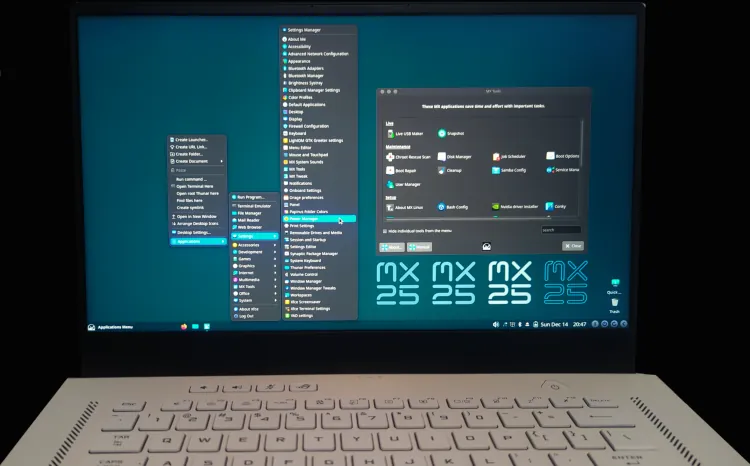
Installation, Updates, and My First Snapshot
The installation was uneventful in the best possible way. I accepted the defaults, enabled encryption, rebooted, updated the system (around 200 MB), and rebooted again.
Then came the moment of truth: my first snapshot.
If any of my tweaks went sideways, I could revert to a clean, updated state in minutes. No reinstalling. No “well, I guess I’m distro-hopping again.”
After the snapshot, I installed Brave and GNOME Disk Utility, formatted and LUKS‑encrypted an SD card for off‑device backups, tweaked Brave, refreshed XFCE with a new theme and icons, and took another snapshot.
The workflow felt natural, like using a virtual machine, except without the performance penalty.
MX Snapshots: My New Safety Net
In web design, deadlines don’t care about your operating system. For years, I relied on virtual machines because snapshots were my lifeline. If something happened, I could roll back instantly and keep working.
But VMs have a cost: they never give you the full power of your hardware.
MX Snapshots changed everything. They give me the same safety net, but at full speed. Ten minutes to restore a system to a perfect state. No fear. No hesitation. No “what if this breaks?”
For the first time, I had VM‑level reliability on bare metal.
Bluetooth, Scaling, and Everyday Use
My M10 Bluetooth 5 mouse and Satechi Slim S1 TKL keyboard paired normally. I switched them back and forth between computers several times. No dropouts, no drama.
Scaling on the 1440p 15″ display was equally smooth. XFCE let me switch between 1.25× and 1.5× scaling without fuss. Everything just worked. And honestly, that’s not something I’ve been able to say often about Linux on high‑end laptops.
Battery Life: Setting a 60% Charge Limit with TLP
MX Linux ships with TLP preinstalled, which is a perfect for anyone who cares about battery longevity. On the Zephyrus, you need to set two values, start and stop thresholds, to enforce a proper charge limit.
Here’s the setup:
How to Set a 60% Battery Charge Limit with TLP
- Open Terminal
sudo nano /etc/tlp.conf
- Find and uncomment these lines:
START_CHARGE_THRESH_BAT0=STOP_CHARGE_THRESH_BAT0=
- Set both to your desired values. Here is what I use:
START_CHARGE_THRESH_BAT0=50STOP_CHARGE_THRESH_BAT0=60
- Save and exit (Ctrl+X → Y → Enter)
- Restart TLP:
sudo systemctl restart tlp
Let the battery drain below 60%, then plug in. TLP will enforce the limit from now on. Simple, effective, and essential for long‑term battery health.
The End of the Road (In the Best Way)
There’s a rare feeling you get when you reach the end of a long search, when you finally find something that doesn’t leave you wanting more. That’s what MX Linux AHS feels like on the Zephyrus G15.
My distro‑hopping days are over.
In the past, when something broke, I’d jump ship. Ubuntu 23.10 ran beautifully, then 24.04 didn’t, so I moved on. Manjaro worked until an update bricked my laptop. CachyOS was fast but the excessive, 8GB / month updates were not my thing. Every distro had issues.
But MX Linux gives me something I’ve never had before: a virtual‑machine‑like safety net, without sacrificing performance.
For web design, Blender, video work, photography, creative projects, this is the OS I trust. And trust is everything when your laptop is the engine of your business.
MX Linux didn’t just run well on the Zephyrus. It made the Zephyrus feel complete.