For 25 years, Linux was my operating system of choice, powering the four computers I used to run a small web design agency in Vancouver, Canada. Linux was fine, but it came with a hidden cost: constant system administration and, lastly, kernel regressions. That was the final straw. So I sold most of my Linux rigs, bought a Mac Studio, and switched to macOS.
But here’s the twist: When one Dell PC didn’t sell on Craigslist, I decided to try GhostBSD, just to test the waters. And that’s when something magical happened: I rediscovered the joy of using a computer that just works.
Over the next few days, I found myself spending more time tweaking and working in GhostBSD than on macOS. After becoming comfortable with XFCE, Backup Station, and Software Station, I did a fresh install and started documenting each adjustment along with the reasoning behind it.
If you’re a Linux user tired of the grind, or a Windows 10 user no longer able to upgrade, this site is for you. I’m sharing my notes here with everyone who wants to learn more about GhostBSD, a lesser-known operating system that has become my new daily driver.
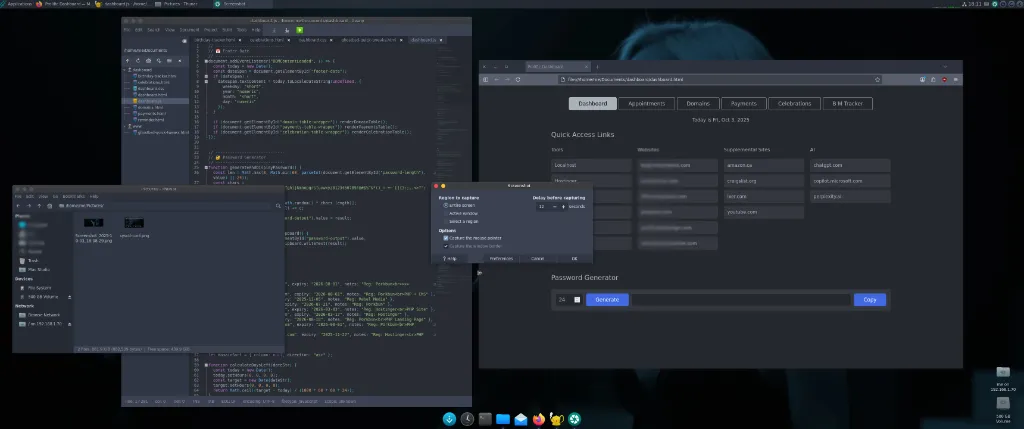
The screenshot above shows my customized XFCE desktop. I’ve spent quite a bit of time refining its appearance and usability, making it feel more consistent and responsive than the default XFCE layout. From theming and panel organization to keyboard shortcuts, every tweak helps keep my workflow quick and uncluttered.
Below is the ongoing GhostBSD Timeline, which documents each major change, challenge, and improvement since the first installation. It also links to related tutorials for anyone following a similar migration path.
GhostBSD Timeline
Sep 25, 2025
Installed GhostBSD 25.02-R14.3p2 – XFCE.
First Backup Station snapshot and system update.
Installed zsh and switched to it with: chsh -s /usr/local/bin/zsh
Installed the powerlevel10k theme as documented in this tutorial.
Sep 26, 2025
PC > DisplayPort cable > Monitor. No audio when playing a YouTube video in Firefox. This tutorial explains how I fixed the no sound on GhostBSD.
Sep 27, 2025
First, I created another snapshot and then, installed SimpleScreenRecorder to capture a YouTube video including system sound. Worked on the first try.
Sep 29, 2025
Took a new snapshot so I can revert all of today’s changes if needed. Installed Geany and Apache. Configured Apache to host PHP sites locally.
Sep 30, 2025
To take Geany for a spin by adding a new feature to my dashboard app and refactoring the code to keep the project clean and maintainable.
Oct 2, 2025
Fresh install of the XFCE edition for the purpose of improving the documentation I publish here. Started a new web app so I can see how long my Logitech mouse battery lasts.
Oct 4, 2025
Today’s system update on GhostBSD completed without any issues. A special mention goes to Backup Station, which quietly did its job in the background by creating a boot environment snapshot before the update.
Oct 7, 2025
Installed smartmontools to check SSD health. Also published a quick tutorial for anyone interested in monitoring their SSD’s condition on GhostBSD.
Oct 15, 2025
Removed most nonessential firmware packages to stress-test GhostBSD and published a tutorial detailing the process. I did not expect it to boot as over 100 firmware packages were purged. But, it did. Impressive!
Oct 16, 2025
Changed the firewall profile and wrote the Simplified and Secure IPFW Guide for future reference. By default, GhostBSD ships with the workstation profile, which is a bit too broad for my setup.
Oct 24, 2025
Installed today’s system update, which included 41 packages. After a month of using GhostBSD, I’ve started taking Software Station for granted. It just works and never gets in the way.
Oct 27, 2025
Hooked up multimedia speakers to the rear audio port on my PC. This fixed the problem where sound wouldn’t play after waking from sleep. I usually do audio work on the Mac, but it’s nice to have working speakers on the PC for YouTube videos.
Nov 3, 2025
Updated from 14.3-RELEASE-p2 to 14.3-RELEASE-p4. Although this was a large update that upgraded over 100 packages, the system has been running perfectly.
Nov 15, 2025
No new updates have been released since the last patch, and the system continues to perform flawlessly. Everything remains stable and trouble-free.
Nov 25, 2025
Just updated 65 packages. GhostBSD rebooted without issues.
Dec 5, 2025
Today, I replaced GhostBSD with MX Linux because I am starting a new project that requires OnionShare. Since I don’t want to run this application on either my Windows laptop or my Mac Studio, I decided to revert my Dell PC back to Linux. In the past, all Linux distributions I tried on this hardware suffered from issues such as audio hiss, boot issues, and lag. MX Linux, however, appears unaffected and runs flawlessly.
For the time being, I continue my programming and web design work on GhostBSD, which now runs in a VirtualBox VM.