Fedora has a reputation for being one of the most polished Linux distributions available today. After spending several hours running Fedora 43 on my Asus Zephyrus G15 (2021, AMD 5900HS CPU, RTX 3080, 32GB RAM, 1TB NVMe SSD), I can confirm that the operating system is rock solid in many respects. But there’s one nagging issue: slow application launches. If you can live with that compromise, Fedora 43 is a top contender.
Stability Where It Matters Most
Every Linux distribution I test faces one critical hurdle: wakeup from suspend/sleep. If it fails, the distro is immediately disqualified. Fedora 43 passed with flying colors. Suspend and wakeup are flawless. This reliability alone makes Fedora stand out.
Another pleasant surprise was display scaling. Fedora automatically scaled my laptop’s 15″ 1440p display to 133% while keeping my external 34″ ultrawide at 100%. For long-time Linux users, this is huge. Multi-monitor scaling used to be a weak point, but Fedora 43 handled it seamlessly.
Peripheral Support: Mostly Smooth
- Bluetooth mouse (Aliexpress M10): Instantly recognized, paired with one click, and remembered across reboots. Even switching between my Dell PC and laptop worked flawlessly.
- Bluetooth keyboard (Satechi Slim S1): Oddly refused to pair, but using the USB dongle solved the issue.
- XPPen Deco Pro tablet: Due to telemetry concerns, I keep this device air-gapped on my Mac and won’t be using it on Fedora.
- I keep my XP-Pen Deco Pro tablet on an air‑gapped Mac because of telemetry concerns. While XP-Pen claims data collection is for quality improvements, the lack of transparency means I can’t rule out the possibility of screen captures or usage data being transmitted to their servers. For creative professionals working on NDA‑protected projects, this is a risk worth considering before installing vendor drivers on Fedora.
Overall, peripheral support was solid, with only minor hiccups.
Software Choices: Avoiding Flatpak Pitfalls
When I first installed GIMP through GNOME Software, I made sure not to select the default Flatpak option and instead chose Fedora sources. Yet, despite that, Fedora still installed the Flatpak version of GIMP. The result? Noticeably delayed application launches. Every time I clicked the Gimp icon, there was an irritating pause before the program began to load.
To fix this, I removed the Flatpak build with:
flatpak uninstall org.gimp.GIMPThen I installed the native RPM package directly from Fedora’s repositories:
sudo dnf install gimpThis gave me GIMP 3.0.6 as an RPM, and the difference was immediate. Pressing the GIMP icon now launches the application loader instantly, with no noticeable delay. In other words, the sluggish startup was entirely due to the Flatpak packaging.
This experience reinforced my stance: I will never adopt Flatpak applications when a native RPM alternative exists. Flatpaks may have their place for sandboxing and portability, but for performance and responsiveness, RPMs remain my choice.
Next, I edited /etc/dnf/dnf.conf to streamline package management:
[main]
assumeyes=True
countme=False
max_parallel_downloads=10assumeyes=Trueskips confirmation prompts.countme=Falsedisables Fedora’s mirror telemetry.max_parallel_downloads=10speeds up updates.
These tweaks make Fedora feel more responsive and private.
Graphics and Battery Management
Instead of using a USB‑C to DisplayPort cable, I rely on a high‑quality HDMI connection for my external monitor. With this setup, Fedora defaults to the integrated AMD graphics for everyday tasks, only switching to the NVIDIA GPU when heavy workloads demand it.
This balance is ideal for battery life and keeps the system cool during normal use. Running nvidia-smi confirmed that CUDA 13 is installed and ready, so I’m confident Blender 5 will take full advantage of the RTX 3080 when needed.
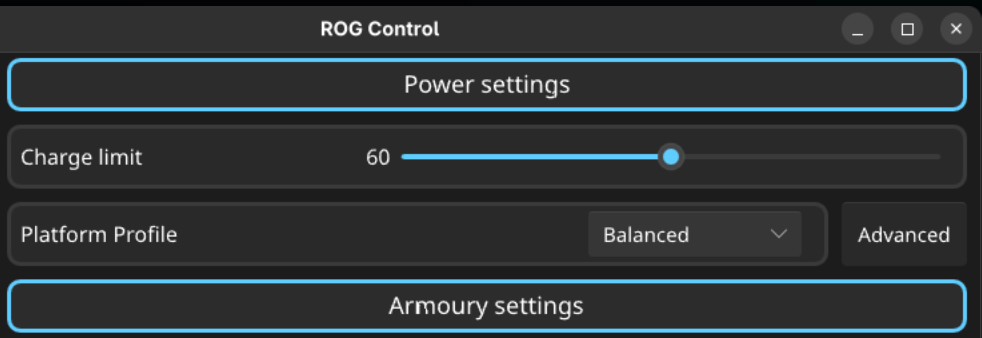
Battery management is another highlight. With asusctl and its daemon installed, I set charging to stop at 60%. This feature is invaluable for long-term battery health. Starting the GUI with:
rog-control-centerallowed me to disable the ridiculous blinking keyboard during sleep, a “feature” from ASUS that nobody asked for. Honestly, it’s a nasty dumb gimmick, and I’m glad the developers of rog-control-center gave us an option to make it right.
Performance: The Snail in the Room
Here’s the sticking point: application launch speed. On macOS and MX Linux, apps start instantly. On Fedora 43, every app takes 2+ seconds to launch. For single-computer users, this might not matter. But for those of us working across multiple systems, it’s noticeable and borderline annoying. It reminds me of waiting for programs to load on an Atari back in 1992.
This isn’t unique to Fedora. I tested Ubuntu 25.10 recently and uninstalled it the next day because Rust-based apps were painfully slow to launch. That leaves Fedora as the most practical choice, despite the lag.
Verdict: A Top Contender With Caveats
If it weren’t for the slow app starts, Fedora 43 would be a top-notch distribution. It nails the essentials: suspend/wake reliability, display scaling, hybrid graphics, battery management, and peripheral support. The system is stable and feels professional.
But the lag is real. For users with multiple computers, it’s hard to ignore. If you’re willing to compromise on launch speed, Fedora 43 is a strong contender. If instant responsiveness is non-negotiable, you may need to check out CachyOS.
For now, Fedora stays on my Zephyrus G15. If it continues to deliver stability and reliability, I may learn to overlook the sluggish app launches. After all, in the world of Linux distributions, practical solutions are slim and so Fedora 43 is one of the best options available today.