Black Friday Treat: A New XPPen Drawing Tablet
Black Friday rolled around again, and this year I treated myself to a new drawing tablet. After some research, I found an amazing deal on BestBuy.ca: the 11″ x 7″ XPPen Deco Pro Gen2 tablet for just CAN $165.99.
Setup on my Mac was quick and painless. The only disappointment was discovering that Pixelmator Pro doesn’t play well with it. Thankfully, last year’s Black Friday purchase, the Affinity Suite, saved the day. Affinity Photo worked beautifully with the Deco Pro, making the tablet instantly useful for creative work.
Discovering the Hidden Gem: The Shortcut Remote
The package also included a shortcut remote. At first, I didn’t plan to use it as I’ve always use keyboard shortcuts. But then I wondered: could this remote be mapped to Blender’s shortcuts?
As a Blender user with a TKL keyboard (no numpad), this idea was a game‑changer. If the remote could replicate Blender’s numpad keys, my workflow would improve dramatically.
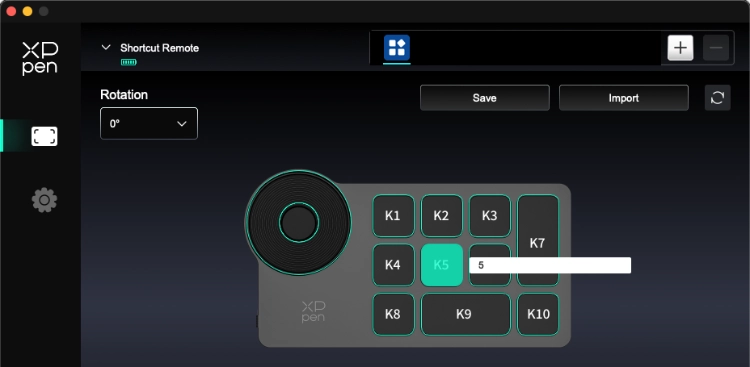
Setting Up the Remote for Blender
Here’s how I configured the remote to act as a Blender navigation aid:
- Connect a full‑size keyboard (in my case, my old Razer) to access the actual numpad keys.
- Open the XPPen software and select Shortcut Remote from the dropdown.
- Most buttons already had a preset, but I wanted custom ones.
- Click on a button.
- From the pop‑up, select Shortcut.
- Click in the field to give it focus.
- If a preset was there, delete it with the trash icon.
- Press the desired numpad key to assign it.
- Repeat for the buttons you want to map.
- Safe!

When finished, I tested it in Blender and it worked flawlessly. Instead of pressing the tilde (~) key and navigating the radial menu, I could now press the remote to instantly switch views or trigger a render, just as if I had a full‑size keyboard connected.
Why This Matters for Blender Users
For Blender artists, especially those using compact keyboards or a laptop, the XPPen remote is a hidden powerhouse. It transforms into a shortcut navigation aid, giving you:
- Instant access to Front, Top, Right views.
- One‑tap F12 renders.
- A workflow that feels as smooth as using a full numpad.
If you’re in the market for a drawing tablet for texture painting or 3D work, the XPPen Deco Pro Gen2 should be high on your list. It’s not just a tablet, it’s a productivity upgrade for Blender.