For years, the term dark net has been painted with a brush of mystery and suspicion. In reality, it’s not nearly as “dark” as popular culture suggests. Beneath the headlines, the Tor network offers something profoundly useful: a decentralized way to host websites, share files, and even run private chats, all without the usual barriers imposed by internet service providers.
This is where OnionShare comes in. It’s a free, open-source tool that transforms Tor’s hidden services into a practical platform for everyday hosting. Whether you want to publish a personal project, share files securely, or experiment with self-hosting, OnionShare makes it possible with almost no setup.
Why OnionShare?
Most ISPs forbid customers from running web servers at home. Even if they didn’t, configuring routers, opening ports, and securing traffic can be a headache. OnionShare sidesteps all of this. It uses Tor to create a hidden service that “just works.” Your ISP will see that you’re using Tor, but it won’t know what content is being served or in which direction it flows.
For those of us who value simplicity and independence, OnionShare is a revelation. It’s not about secrecy, it’s about convenience and freedom.
The Ideal Setup
The best way to run OnionShare is on a spare Linux PC. You don’t need a powerhouse machine; in fact, modest hardware is ideal. A Dell Optiplex or Precision with an integrated Intel UHD630 graphics chip consumes around 30 watts, perfect for a low‑power, always‑on host.
For the operating system, I recommend MX Linux. Beyond being lightweight and user-friendly, MX Linux includes a unique feature: the ability to create a snapshot ISO of your fully configured system. Think of it as a backup you can boot from. Once OnionShare is installed and configured, snapshotting ensures you can restore your setup quickly if needed.
Installing OnionShare
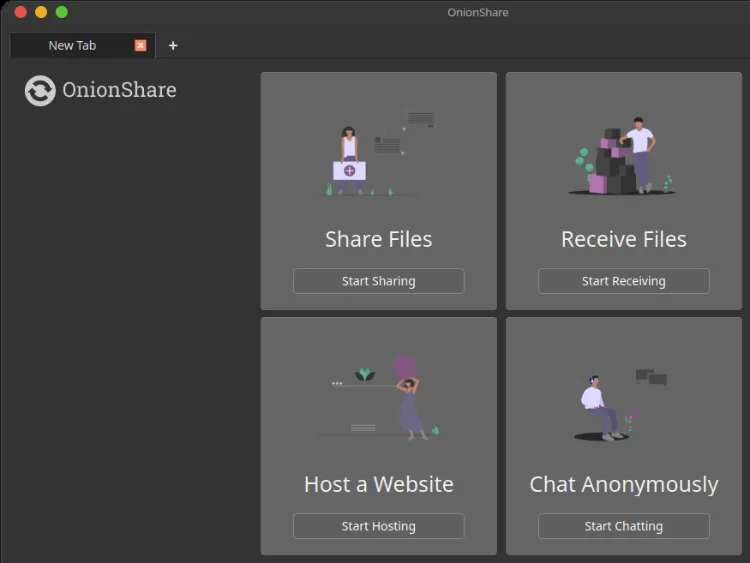
On MX Linux, OnionShare is available directly through the package manager. Once installed, you’ll see four core options:
- Send: Share files securely with others.
- Receive: Accept files from others without exposing your IP.
- Host Website: Serve static HTML, CSS, and JavaScript projects as onion sites.
- Chat: Run private, anonymous chatrooms.
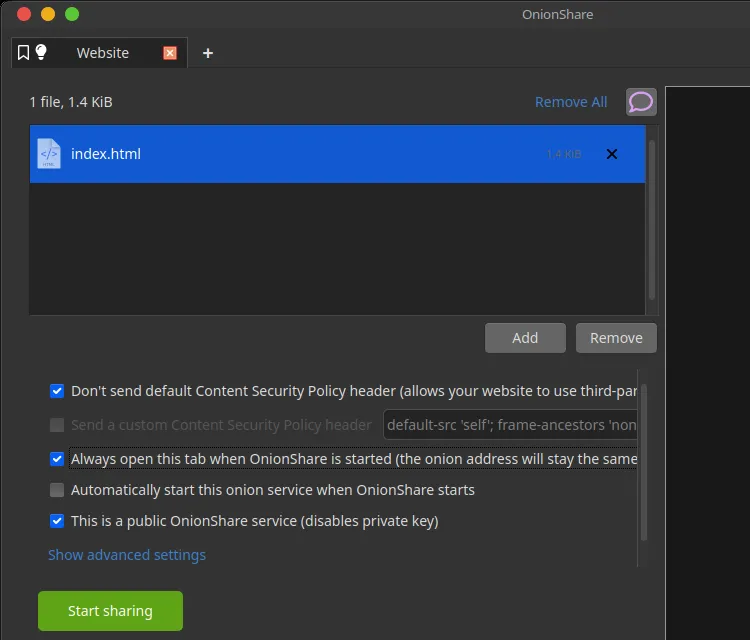
For our purposes, the Host Website option is the star. It allows you to publish a site directly from your PC, accessible via a .onion address.
Browsers and Onion Links
Onion links look like long strings ending in .onion. They aren’t accessible through standard browsers like Chrome or Safari. Instead, you’ll want:
- Tor Browser: The official choice, designed specifically for onion services.
- Brave: A privacy‑focused browser that can also handle onion links, favored by those who want to minimize tracking.
Other browsers may add support in the future, but for now, Tor and Brave are the most reliable options.
What Is an Onion Link?
An onion link is essentially a domain name that exists only within the Tor network. Instead of being registered through ICANN or tied to DNS servers, it’s generated cryptographically when you start an onion service. This makes it free, decentralized, and independent of traditional internet infrastructure.
When you stop and restart OnionShare, the address may change unless you save your tab as persistent. In that case, the same onion link will remain valid across sessions.
Why This Matters
Self‑hosting through OnionShare is more than a technical trick. It’s part of a broader movement toward decentralization. Just as Linux began as a niche experiment in the 1990s and grew into a cornerstone of modern computing, onion services could evolve into a mainstream way to publish content without gatekeepers.
By running your own onion site, you’re taking part in a movement to reshape the internet itself. Instead of relying on corporations, paid domains, or restrictive ISPs, you’re proving that anyone can publish and share content directly from their own computer. It’s about reclaiming independence, lowering barriers, and showing that the web can belong to individuals again.
Looking Ahead
Soon, a portion of this very website will be available as an onion site, hosted for free on the Tor network. Visitors using Tor or Brave will be able to access it directly, on my own server, bypassing traditional hosting providers. It’s a small step, but one that points toward a future where decentralized hosting is not just possible, but practical.
OnionShare proves that the dark net is simply another layer of the internet, one that empowers individuals to host, share, and connect on their own terms.
Final Thought: If you’ve ever wished for a simpler, freer way to host your work, OnionShare is worth exploring. It requires no changes to your ISP modem, no domain registration, and no extra accounts. Just install, click “Host Website,” and you’re part of the decentralized web.